
CART
 college store logo
Please enter search criteria.
Sub-Total: $0.00
Digital Course Materials at Saint Paul College
Inclusive Access
The Saint Paul College Campus Store, in collaboration with instructors and textbook publishers, has created the Inclusive Access program in order to reduce the cost of textbooks. When a class uses Inclusive Access, the required course materials will be available to students online through D2L. Inclusive Access materials cost less than the normal price of the books or access codes.

- Your instructor chooses Inclusive Access course materials for their class.
- The Inclusive Access course materials are added to D2L.
- If you are enrolled in an Inclusive Access course, you will be automatically charged a fee for Inclusive Access on your student bill in eServices.
- Inclusive Access materials are available to use the first day of class! Access the materials in your course’s D2L Brightspace site. Your instructor will provide the link. You will also receive a welcome email with additional information.
If you already own this material, you will need to opt-out of Inclusive Access.
- You must use the opt-out link in D2L.
- The fee will be removed from your eServices bill after the opt-out deadline.
- You will lose access to the materials through D2L.
- You will be responsible for purchasing the required materials from another source.
If you decide Inclusive Access isn’t for you, you can opt-out. You must opt-out by the posted deadline. Inclusive Access is non-refundable after this date.
If you drop the course by the add/drop deadline, the fee will be removed from your student account.
Lower Cost
Inclusive Access course materials cost less than printed textbooks and access codes (but they are not free). To date, the Saint Paul College Inclusive Access program has saved students over $3 million, a number that will continue to grow!
Available the First Day of Class – No Need to Order!
You will be able to log in to your course’s D2L site at the start of the semester to access your Inclusive Access materials.
Inclusive Access course materials are billed directly to your student account in eServices if you are enrolled in the class. Do not purchase the materials elsewhere, or you might be charged twice.
More Than Just eTextbooks
Inclusive Access materials can also contain online access to assignments, tests, etc. required for the class.
- Check the welcome email you received.
- Visit VitalSource Learner Support for self-service documentation.
- Chat with the VitalSource Support Team (available 24/7, fastest option) or send an email to [email protected].
Here's how you can get help with your Inclusive Access course materials:
eBooks
Some course materials are available for purchase as eBooks on the Campus Store’s website. Look for the Digital format option when you order. Some access codes are also available in a digital format.
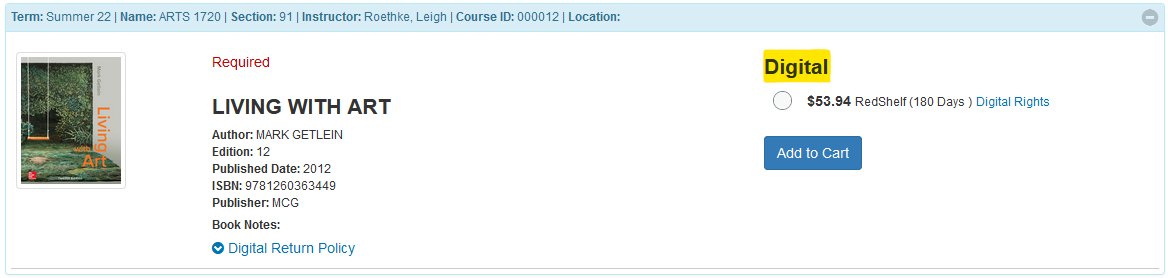
- Go to saintpaulcollegebookstore.com
- Log in to your store account with the same email address and password you used to place your order.
- Click on the Activate and Access eBooks link.
- Click on the IMAGE of the book. (NOT the in-store purchase link)

- You will then be taken VitalSource to complete the activation process.
- Some eBooks and online courseware are hosted on the publisher’s website. For these products, you will get a code from VitalSource that you will need to redeem on the publisher’s website. Sometimes a Course Key may also be required, which you will need to obtain from your instructor.
- Check D2L, your syllabus, and/or your school email for special activation instructions provided by your instructor.
- Remember: the email address you use for your VitalSource account must match the email address you used to place your order.
When you order an eBook or publisher access code, it is ready to activate as soon as you complete the checkout process and your payment is approved. Nothing will be shipped to you. Instead, you will receive an email with activation instructions.
Please note: once you activate your eBook or publisher access code, it cannot be returned. Sorry, no exceptions.
Helpful hints
eBooks can have different digital rights – some are only available to use for a limited number of days, some allow lifetime access. Please review the digital rights for an eBook carefully before ordering. eBooks have very strict return policies.
In addition, some eBooks may allow note-taking, highlighting, offline usage, and limited downloading and printing. It all depends on the publisher and the eBook platform.
Some eBooks and publisher access codes also include access to online courseware used for assignments and tests.
- All refund requests must be made within 14 days of purchase.
- eBooks and publisher access codes that have been activated cannot be returned for a refund.
If you need to return an eBook or publisher access code, contact us right away at [email protected]
eBooks have very strict return policies:
Sorry, there are no exceptions to this return policy.
- Check D2L, the course syllabus, or your school email for special instructions provided by your instructor.
- Do you need help with a publisher access code? VitalSource's publisher access code guide will show you how to access products like Cengage Unlimited, MindTap, and WebAssign; McGraw Hill Connect; Pearson MyLab, Mastering, and Revel, etc.
- Visit VitalSource's BookShelf support pages for self-service documentation -- including links to download the Bookshelf app, troubleshooting tips, account help, and FAQs.
- Chat with the VitalSource Support Team (available 24/7, fastest option) or send an email to [email protected].
Here’s how you can get help with your eBook or publisher access code:
OERs (Open Educational Resources)
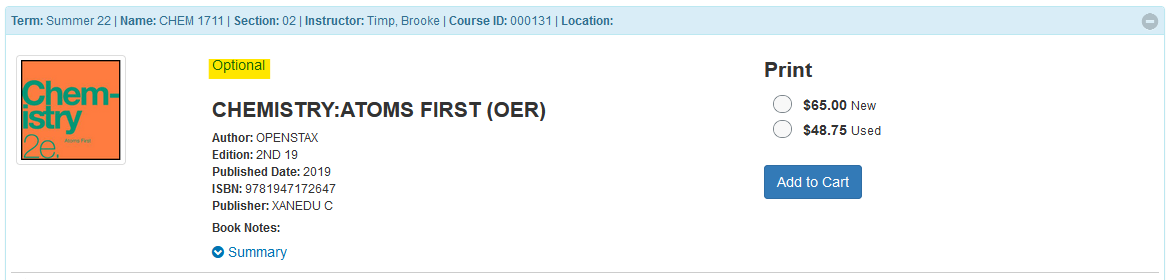
OERs are openly-licensed textbooks. Some are available free online. An optional low-cost print version may be available for purchase through the Campus Store. We recommend attending class first or talking with your instructor to determine if the print copy would be beneficial to you.
Digital Course Materials @ Saint Paul College
Direct Digital Access
The Saint Paul College Campus Store, in collaboration with instructors and textbook publishers, has created the Direct Digital access program in order to reduce the cost of textbooks. When a class uses Direct Digital, the required course materials will be available to students digitally through D2L. Direct Digital materials cost less than the normal price of the books or access codes.
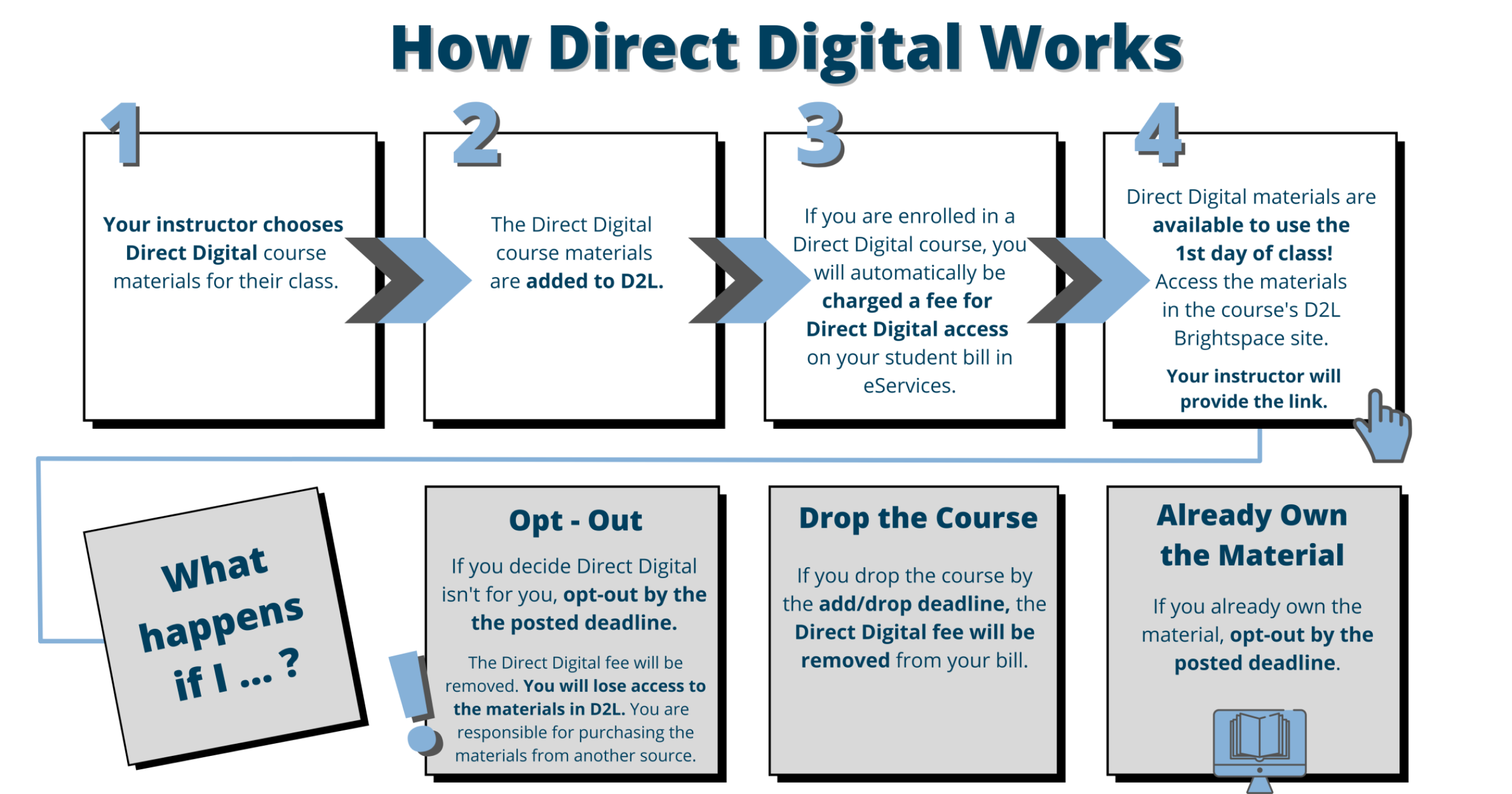
- Your instructor chooses Direct Digital course materials for their class.
- The Direct Digital course materials are added to D2L.
- If you are enrolled in a Direct Digital course, you will be automatically charged a fee for Direct Digital access on your student bill in eServices.
- Direct Digital materials are available to use the first day of class! Access the materials in your course’s D2L Brightspace site. Your instructor will provide the link.
If you already own this material, you will need to opt-out of Direct Digital access.
- You must use the opt-out link in D2L. Look for the RedShelf link.
- The fee will be removed from your eServices bill after the opt-out deadline.
- You will lose access to the materials through D2L.
- You will be responsible for purchasing the required materials from another source.
If you decide Direct Digital isn’t for you, you can opt-out. You must opt-out by the posted deadline: the Friday of the second week of the semester. Direct Digital access is non-refundable after this date.
If you drop the course by the add/drop deadline, the fee will be removed from your student account.
Lower Cost
Direct Digital course materials cost less than printed textbooks and access codes (but they are not free). Saint Paul College’s Direct Digital program saves students over 1 million dollars a year!
Available the First Day of Class – No Need to Order!
You will be able to log in to your course’s D2L site at the start of the semester to access your Direct Digital materials.
Direct Digital course materials are billed directly to your student account in eServices if you are enrolled in the class. Do not purchase the materials elsewhere, or you might be charged twice.
More Than Just eTextbooks
Direct Digital materials can also contain online access to assignments, tests, etc. required for the class.
Contact RedShelf for help: https://solve.redshelf.com/hc/en-us/requests/new
RedShelf Student Support for answers to frequently asked questions (look under "Inclusive Access")
eBooks
Some course materials are available for purchase as eBooks on the Campus Store’s website. Look for the Digital format option when you order. Some select access codes are also available in a digital format.
- Go to saintpaulcollegebookstore.com
- Log in to your store account with the same email address and password you used to place your order.
- Click on the Activate and Access eBooks link.
- Click on the IMAGE of the book. (NOT the in-store purchase link)
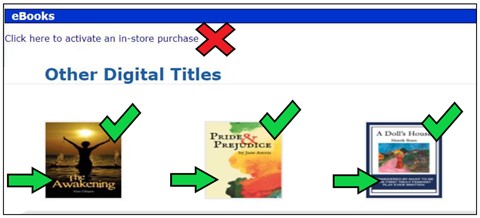
- You will then be taken to RedShelf to complete the activation and download process. The email address you use for your RedShelf account must match the email address you used to order your eBook.
- Some eBooks and online courseware are hosted on the publisher’s website. For these products, you will get a code from RedShelf that you will need to redeem on the publisher’s website.
When you order an eBook or digital access code, it is ready to activate as soon as you complete the checkout process and your payment method is approved. Nothing will be shipped to you. Instead, you will receive an email with activation instructions.
Please note: once you activate your eBook or digital access code, it cannot be returned. Sorry, no exceptions.
eBooks can have different digital rights – some are only available to use for a limited number of days, some allow lifetime access. Please review the digital rights for an eBook carefully before ordering. eBooks have very strict return policies.
In addition, some eBooks may allow note-taking, highlighting, offline usage, and limited downloading and printing. It all depends on the publisher and the eBook platform.
Some eBooks and digital access codes also include access to online courseware used for assignments and tests.
- All refund requests must be made within 14 days of purchase.
- eBooks and digital access codes that have been activated cannot be returned for a refund.
If you need to return an eBook or digital access code, contact us right away at [email protected]
eBooks have very strict return policies:
Sorry, there are no exceptions to this return policy.
Contact RedShelf for help: https://solve.redshelf.com/hc/en-us/requests/new
RedShelf Student Support for answers to frequently asked questions
RedShelf Publisher Courseware Help
OERs (Open Educational Resources)
OERs are openly-licensed textbooks. Some are available free online. An optional low-cost print version may be available for purchase through the Campus Store. We recommend attending class first or talking with your instructor to determine if the print copy would be beneficial to you.
